Contractor CRM Software

Contractor CRM software shaped around field service workflows.

A contractor CRM should make the day easier, not add more admin work. Arsenal Media builds CRM-style systems for leads, customers, estimates, jobs, tasks, and follow-ups.

Built for real business use

Contractor CRM Software for Texas contractors and service businesses

Contractors do not always need a huge off-the-shelf CRM. Many need a practical system that matches how their team sells, schedules, estimates, communicates, and finishes jobs.

For roofers, curbing teams, remodelers, plumbers, landscapers, and other field service businesses, the right CRM can connect the front office to the field without burying the team in clicks.

Arsenal Media can create contractor CRM software as a working demo, client-specific app, or production system with the screens and data your business actually needs.

What this page covers

Lead capture and lead source tracking
Customer records, notes, photos, and job history
Sales pipeline and project pipeline views
Estimate, quote, and appointment tracking
Owner dashboards, reports, and recent activity
Contractor CRM software sales pipeline business dashboard and workflow automation screen
Arsenal Media

Clean pages. Useful systems. Clear next steps.

The goal is not to add tech for the sake of tech. It is to make the work easier to understand, easier to track, and easier to sell.

Talk Through the Project
Benefits

What this helps fix.

These are the kinds of practical improvements Arsenal Media looks for first, especially for contractors, roofers, local service teams, and growing field operations.

Follow-up

Fewer dropped leads

Keep new opportunities, appointments, estimates, and follow-ups visible so good leads do not disappear in texts or inboxes.

Production

Cleaner job tracking

Move from sold work into project tracking with statuses, tasks, notes, photos, and customer details in one place.

Reporting

Better sales visibility

Give owners a practical dashboard for pipeline value, active jobs, quote status, and team activity.

Process

How a project usually moves from idea to useful.

We start with the real workflow, not a template. Then we turn that into a focused page, prototype, dashboard, or demo that can be tested before bigger commitments are made.

1
Define the pipelineWe map the steps from first lead to sold job, scheduled work, completion, and follow-up.
2
Set the customer recordWe decide what belongs on the customer profile: notes, photos, addresses, roof details, measurements, quotes, tasks, or appointments.
3
Build the working screensThe demo starts with the screens your team will use most: dashboard, leads, customers, jobs, estimates, and calendar.
4
Add automations carefullyOnce the workflow is right, we can add email notifications, reminders, branded forms, reports, and integrations.
Pricing direction

Project size depends on what needs to be built.

No two builds are exactly the same, so these are planning ranges by type of project rather than fixed prices.

CRM Demo

Sales workflow prototype

Best for showing the sales process, customer profile, dashboard, and pipeline before connecting real data.

Team Tool

Focused contractor CRM

Best for businesses that need leads, customers, estimates, jobs, tasks, and reporting in a private internal tool.

Advanced

CRM with integrations

Best when the CRM needs email, measurement tools, invoices, files, user roles, or API connections.

Related work

Examples that connect to this service.

These case studies show the kind of practical, visual, demo-ready work Arsenal Media builds for contractors and service businesses.

MFR Roofing CRM dashboard case study
Roofing CRM

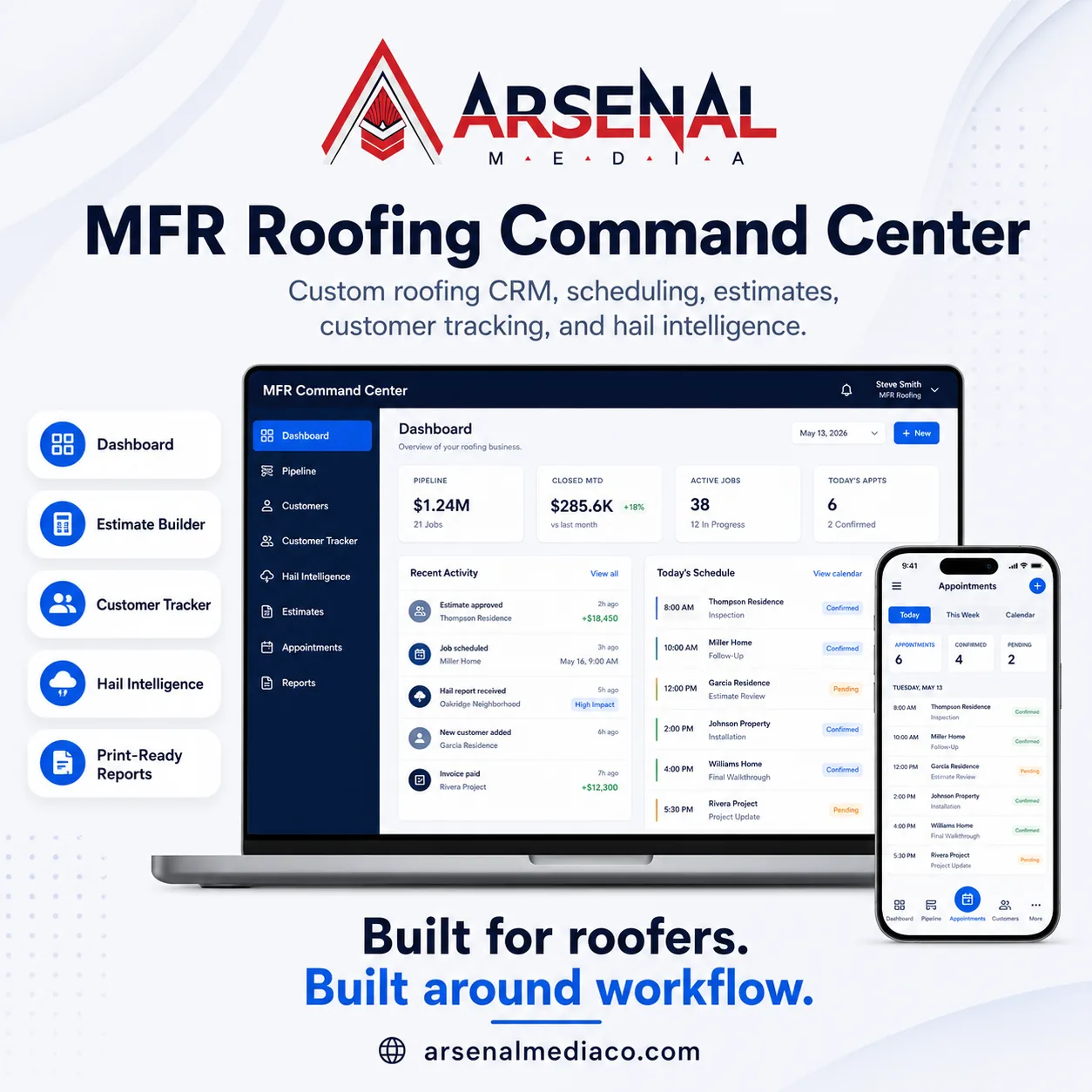
MFR Roofing Command Center

A contractor CRM concept for roofing teams with estimates, quote design, customer tracking, and hail intelligence.

View Case Study
CurbFlow operations app for contractors
CurbFlow

CurbFlow Operations Center

A curbing contractor operations center with leads, quotes, job readiness, and work tracking.

View Case Study
Customer portal and project tracking software screen
Customer Tracking

Customer Experience Screens

Customer and project tracking patterns that help service teams keep context in one place.

View Case Study
Questions

Questions before starting.

Good projects start with plain answers. Here are the things most business owners ask before getting into the details.

Is this a replacement for JobNimbus, Jobber, or a standard CRM?

It can be, but it does not have to be. Sometimes the smarter move is a focused tool that fills gaps around the systems a contractor already uses.

Can this track both sales and production?

Yes. A contractor CRM can include separate sales and project pipelines so leads, sold jobs, active work, and completed projects are not mixed together.

Can it include estimates and quote design?

Yes. Estimate builders, quote templates, branded proposal screens, and customer-facing quote views can be part of the build.

Can employees enter leads from the field?

Yes. A simple lead entry form can let employees capture referrals, neighborhood opportunities, or walk-up leads without giving customers access to the app.

Can we use dummy data first?

Yes. Demos can be built with safe sample data so the workflow can be reviewed before connecting real customers or production data.

Next step

Need this built around your business?

Send over the workflow, website, quote process, or lead problem that is slowing the team down. I’ll help turn it into a practical next step.

Start a Project